Dashboard Overview
Once you’ve logged into Mockhub, you’ll land on your Dashboard.
This is the central hub where you can manage your projects, clients, and media library all in one place.
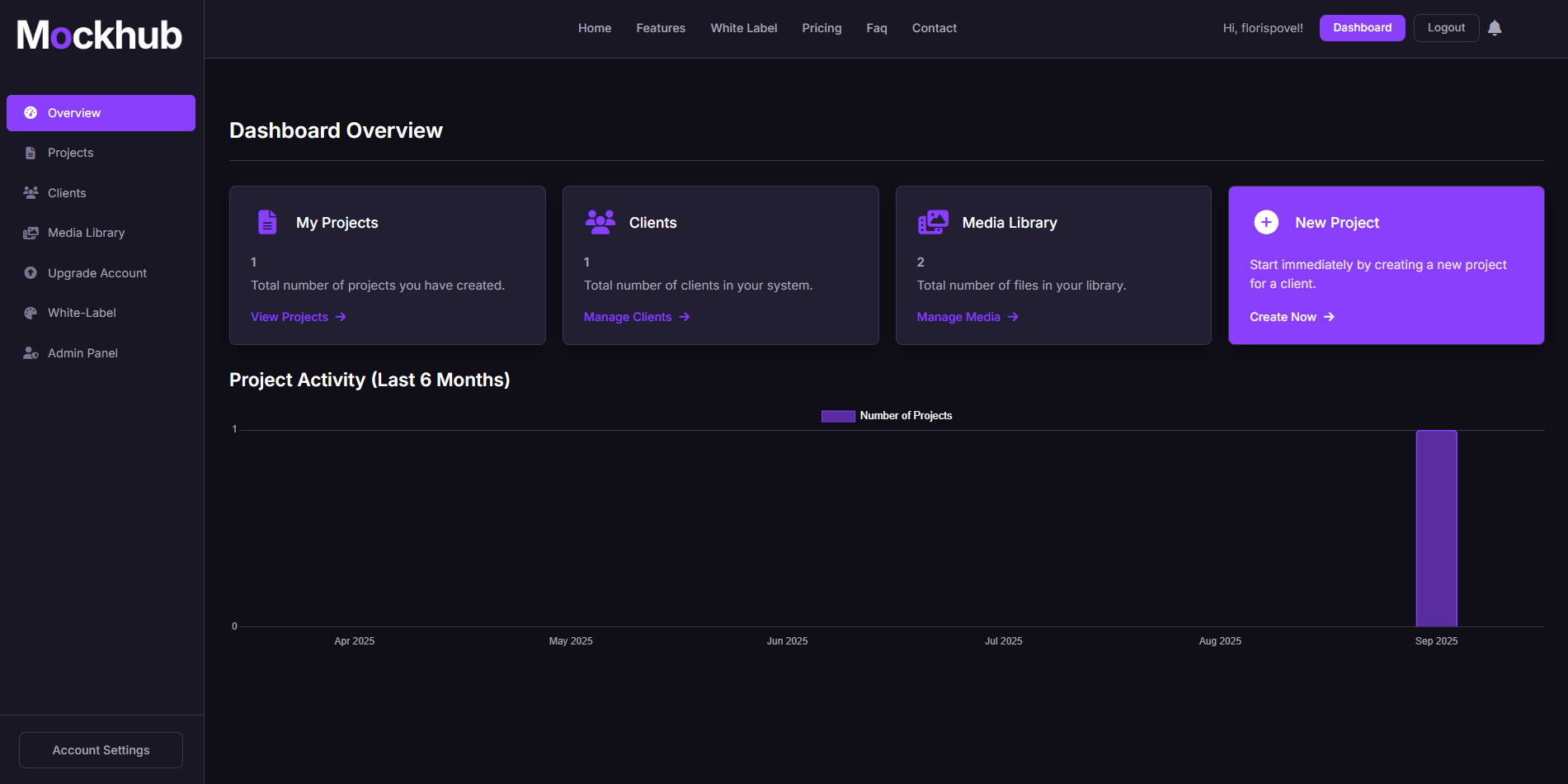
📊 What You’ll See on the Dashboard
-
My Projects
Shows the total number of projects you’ve created.
👉 From here, you can quickly access your project list. -
Clients
Displays the number of clients in your system.
👉 Click Manage Clients to add, edit, or remove clients. -
Media Library
Keeps track of all your uploaded files and assets.
👉 Click Manage Media to organize your media library. -
New Project
Start immediately by creating a new project for one of your clients.
👉 Click Create Now to begin.
📈 Project Activity
At the bottom of the dashboard, you’ll find a Project Activity graph that shows how many projects you’ve created over the last 6 months. This helps you keep track of your productivity and client workload.
🖼️ Example of the Dashboard
✅ What’s Next?
From the dashboard you can:
- Open Projects to create or manage your work.
- Add new Clients for better project organization.
- Upload and manage files in the Media Library.
- Upgrade your account or enable White-Label features.
Need help navigating the dashboard? Visit our FAQ or contact support@mockhub.app.